


What Is POS Hardware? A Complete Guide for Businesses in Australia
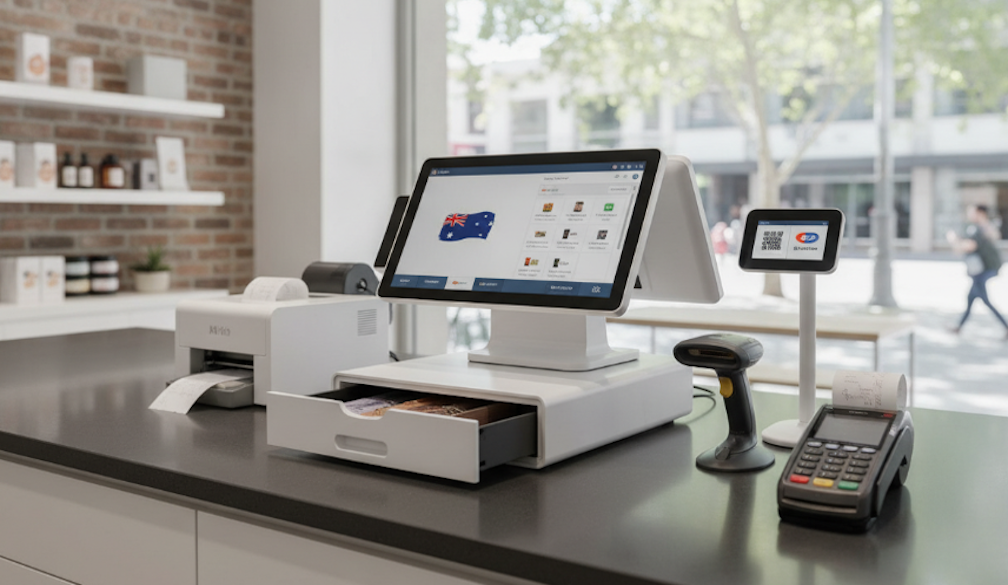
POS hardware refers to all the physical devices used at the point of sale — the moment a customer pays for goods or services. Think of it as the tangible side of your POS system. The software does the thinking, but the hardware does the doing.
In a typical Australian business, you'll find a mix of input devices (scanners, card readers, touchscreens) and output devices (receipt printers, kitchen printers, customer-facing displays). Together, they form the checkout ecosystem that keeps money moving and records clean.
The traditional cash register — that clunky machine that only stored cash and printed receipts — is largely a relic. Today's POS hardware connects to cloud-based software, talks to your accounting system, tracks your stock in real time, and even helps you spot your busiest trading hours. For Australian businesses dealing with EFTPOS as a payment standard, contactless card growth, and the popularity of digital wallets like Apple Pay and Google Pay, having the right hardware isn't optional. It's operational.
The Core Components of a POS Hardware Setup
1. The POS Terminal (Register)
The POS terminal is the centrepiece of your setup — the device where your POS software runs. It could be an Android tablet, an iPad, a touchscreen all-in-one unit, or a traditional desktop computer. Most modern businesses in Australia lean toward tablets or purpose-built touchscreen terminals because they take up less counter space and are easier to update.
When picking a terminal, look at processor speed (you don't want lag during a Saturday lunch rush), screen size, and whether the device is Android-based or iOS. Many Australian POS providers — including POSApt — are Android-first, which tends to keep hardware costs lower.
2. EFTPOS Machine / Card Reader
In Australia, EFTPOS is the default. According to the Reserve Bank of Australia, debit cards made up around 75% of retail payments in recent years, and that figure has only climbed as contactless transactions become second nature.
An EFTPOS terminal that integrates directly with your POS software is a game-changer. Instead of manually punching the sale amount into a separate terminal, the POS sends it across automatically. Once payment is approved, the system updates the sale and inventory records simultaneously. That kind of tight integration cuts down errors and speeds up every checkout.
Look for terminals that support tap, chip and PIN, and contactless wallets. EMV chip compliance is the current Australian standard, though swipe is still technically supported as a fallback.
3. Receipt Printer
Despite the rise of digital receipts, a significant number of Australians still want paper. Receipt printers come in two main types: thermal printers (the most common, using heat-sensitive paper instead of ink) and impact/dot-matrix printers (better suited for environments like kitchens where grease or moisture is a factor).
Popular options in Australia include the Epson TM-T82 series, known for their reliability and wide POS compatibility. If you're setting up a new system, make sure any printer you buy is confirmed compatible with your POS software before ordering.
4. Cash Drawer
Cash is far from dead. While card payments dominate, plenty of Australian customers still pay with notes and coins — particularly older demographics and smaller purchase amounts. A sturdy, lockable cash drawer keeps your float secure and connects to your receipt printer or register via USB.
Most POS setups trigger the cash drawer to open automatically when a cash sale is processed, which keeps things smooth and reduces human error at busy periods. Even if you're skewing heavily toward card payments, a cash drawer is still worth having.
5. Barcode Scanner
For retail businesses managing significant stock, a barcode scanner is non-negotiable. It speeds up checkout by eliminating manual entry and feeds directly into your inventory management system, keeping stock counts accurate without the need for separate stocktakes.
Scanners come in handheld wired or wireless versions, and some POS terminals now include built-in scanning cameras. For businesses with large or varied product ranges — think bottle shops, grocery stores, or gift shops — a dedicated scanner is worth the investment.
6. Customer-Facing Display
A customer-facing screen (sometimes called a secondary display or pole display) shows the customer their transaction as it's processed. It's a small addition that makes a noticeable difference: customers can verify item prices in real time, which reduces disputes and builds trust.
Some businesses use this screen to display promotions, loyalty points, or even digital advertisements between transactions. Dual-screen terminal setups that combine the operator interface with a customer-facing display in one device are increasingly popular in Australian hospitality venues.
7. Kitchen Display System (KDS)
Restaurants and cafés often add a Kitchen Display System — a screen mounted in the kitchen that receives order tickets directly from the POS. Instead of relying on printed dockets, kitchen staff see new orders appear in real time, with timing indicators to prioritise workflow.
A KDS reduces paper waste, eliminates the risk of lost tickets, and keeps kitchen communication cleaner during peak service. For any Australian dining venue doing table service or managing multiple order channels (dine-in, takeaway, delivery apps), a KDS is worth serious consideration.
POS Hardware Bundles vs. Individual Components
One of the first decisions you'll make is whether to buy hardware as a bundle or piece by piece. Bundles — pre-packaged sets of compatible hardware sold by your POS provider — take the guesswork out of compatibility. If your POS software provider has tested their bundle together, you can be confident everything will work from day one.
Individual components give you more flexibility and can save money if you already own usable hardware, but you'll need to verify compatibility carefully. Not every printer or scanner works with every system. Before purchasing anything separately, check your POS provider's officially supported hardware list.
What Does POS Hardware Cost in Australia?
Costs vary based on the type and quality of hardware you choose. Here's a rough guide to what Australian businesses typically spend:
- Basic card readers: AUD $65–$100 for compact mobile readers.
- Standalone POS terminals: AUD $300–$1,500 depending on specs and brand.
- Receipt printers: AUD $150–$400 for quality thermal printers.
- Cash drawers: AUD $80–$200 for a solid lockable unit.
- Barcode scanners: AUD $50–$250 depending on type.
- Dual-screen terminals: AUD $800–$1,500 for mid-range all-in-one units.
- Full hardware bundles: AUD $1,000–$3,000 for a small business setup.
Keep in mind there are also ongoing costs to factor in: software subscription fees, payment processing rates, and any support or maintenance contracts. Australian small businesses typically spend between $1,000 and $3,000 in their first year on POS hardware and software combined.
Cloud-Based vs. On-Premise Hardware
Most modern POS systems in Australia run on cloud-based software, which means your data lives on remote servers and is accessible from any device with an internet connection. This has big advantages for multi-location businesses and owners who want to check sales from their phone.
The practical implication for hardware is that cloud-based systems often have lower upfront hardware requirements — you might just need a tablet and a card reader to get started. On-premise systems store data locally and are better suited to environments with unreliable internet, though they require more hardware infrastructure and manual maintenance.
Most reputable cloud POS systems also include offline modes, so if your Wi-Fi drops mid-service, transactions still process and sync when you're back online.
Hardware Considerations by Industry
Retail: Focus on barcode scanners, label printers, customer displays, and terminals that handle high transaction volume. Inventory accuracy is critical.
Restaurants and cafés: Prioritise a fast touchscreen terminal, integrated EFTPOS, receipt printer, and a kitchen display system. Table management and split-billing support are valuable.
Mobile businesses and food trucks: Go lightweight with a tablet-based mPOS setup, a compact mobile card reader, and a portable receipt printer. Ensure the solution has solid offline functionality.
Hospitality venues (pubs, clubs): Need robust hardware that can handle high volumes, multiple tabs, and complex payment splits. All-in-one terminals with built-in EFTPOS work well here.
What to Watch Out For When Buying POS Hardware
A few things Aussie business owners often overlook when shopping for hardware:
- Compatibility first: Not all hardware works with all software. Always confirm compatibility before buying.
- Warranty and local support: Australian-backed support matters when something fails mid-service. Check whether your provider offers local or on-site support.
- Durability for your environment: A café's hardware will get coffee spills. A pub terminal will get bumped. Look for spill-resistant or ruggedised options if your environment demands it.
- Scalability: Buy hardware that grows with you. Adding a second location shouldn't mean replacing everything from scratch.
- Lease vs. buy: Some providers offer hardware on a rental or lease basis, which spreads the cost but can work out more expensive long-term. Understand the total cost before signing anything.
Final Thoughts
POS hardware isn't glamorous, but it's foundational. Get it right and your staff work faster, your customers check out quicker, and your data stays accurate. Get it wrong and you're dealing with compatibility headaches, hardware failures, and lost sales at the worst possible moments.
For Australian businesses, the good news is there's a solid range of hardware options at every price point, with reputable local providers who understand the specifics of our market — from EFTPOS standards to GST compliance. Take the time to map out what your business actually needs before buying, and you'll end up with a setup that pays for itself quickly.


